SQL Saturday #206 – Madison, Wisconsin

SQL Saturday #206

Saturday, April 6th I will be presenting at SQL Saturday #206 in Madison, Wisconsin. This event will be held at Madison Area Technical College – Truax Campus, 3550 Anderson St, Madison, WI 53704.
I will be speaking on the following topic:

Master Data Services
Does your company have similar data in multiple locations? Not really sure which set of data is accurate? With MDS, Microsoft gives you the ability to have one accurate source of non-transactional data to use with your applications or send to other databases and ETL processes. Leverage data stewards to help manage the data repository to ensure it is up-to-date and accurate. In this session we will cover MDS from start to finish including installation, creating models/entities, working with data, using the Excel add-in, security, hierarchies, views, versions, and business rules. After this session, you should have a good understanding of what MDS does, how to use it, and how to get started with your own MDS project.

Check out the SQL Saturday #206 page for more information.

Hope to see you there!

Modern Apps Live! Conference

ModernAppsLive!

While I won’t be speaking at this new conference I wanted to post about the event and mention what a great opportunity it is for app developers.

Modern Apps Live! is an innovative new type of conference, unlike anything you’ve attended before. This conference consists of a single track containing sessions that provide you with an end-to-end narrative covering all aspects of building modern apps using today’s technologies. All the speakers have worked together as a team to bring you the highest quality content such that each session builds on those that have gone before.

Check out the website for more details:
ModernAppsLive!

Be sure to use promo code MAGENIC1 when you register to receive a discount!

Minnesota PASS User Group – 1/15/2013

pass
Next Tuesday I will be presenting on using Proactive Caching in SSAS at the Minnesota User Group. The meeting runs from 4-6pm at the Microsoft Technology Center. For more info you can check their website here: http://minnesota.sqlpass.org/ Hope to see you there. 🙂

Advanced Cube Design – Part 1: Proactive Caching
In this first session of a multi-part series on advanced cube design techniques we will explore using proactive caching. Proactive caching gives you the ability to roll data into your cube automatically as it becomes available while still maintaining MOLAP level performance. We will cover what proactive caching is, when to use it, and how to implement it.

View Running Queries by CPU Time

If you have ever done performance tuning you know it can be a bit of an art and you need your detective hat on. I was recently working on a server that was performing poorly. After looking at resource monitor it was clear that the CPU usage was unusually high. As it turns out SQL Server was utilizing most of the CPU. The hunt was on. I grabbed my magnifying glass and followed the trail. While I could run sp_who2 to find some relevant info, I instead ran the query below. sys.dm_exec_requests returns information about each request that is executing within SQL Server. sys.dm_exec_sql_text returns the text of the SQL batch that is identified by the specified sql_handle.

-- check for queries running. sort by cpu time
SELECT a.session_id, db_name(a.database_id) as db_name, a.start_time, a.command, a.status, a.cpu_time, a.total_elapsed_time, a.reads, a.writes, b.text as query
FROM sys.dm_exec_requests a
OUTER APPLY sys.dm_exec_sql_text(a.sql_handle) b
WHERE a.session_id > 50 -- filter out background tasks
and a.session_id <> @@spid -- filter out this query session
order by a.cpu_time desc

This query shows open queries sorted in descending order by CPU time. I was able to nab a few culprits in the act. I copied the queries to new windows and checked the execution plans. After some intense interrogation it was clear that several tables needed an index and the sub-queries should be turned into joins. Updates were put in place, and the CPU usage went way down. Case closed!

Proactive Caching in SSAS

OLAP cubes use a dimensional model based on Facts and Dimensions. Cubes provide pre-processed aggregations based on available data values. If your cube is small (in the MB’s) and not heavily used, you may want to simply process your cube several times a day. An easy way to do this is by creating an SSIS package and using the ‘Analysis Services Processing Task’.

Proactive caching allows data to continually stream data into the cube. As data comes in, SSAS notices the new data and automatically rolls it into the cube. If you have a lot of small cubes, proactive caching is great because you can keep these cubes up-to-date and you don’t have to schedule a lot of SSIS packages to refresh them all. Cubes are typically data bound by the underlying data sources and their ETL. If you have a very efficient ETL, or no ETL at all, proactive caching may be a good choice for you since data will flow right into the cube.

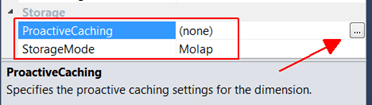
Ok, let’s take a look at how to enable proactive caching on your cubes. If we were to simply turn on proactive caching on the fact table(s) that link to a new dimension value, we could run into trouble. To avoid this we need to first turn on proactive caching on each dimension that could have new data coming in, or where data values may be updated. Go to each Dimension in the cube and go to the properties tab. Near the bottom, expand the Storage section. The default options are Molap and no proactive caching. Click the details button to pull up the Dimension Storage Settings window.
Click on Options.

Check the box on the top to ‘Enable proactive caching’. Feel free to look into the various settings and make adjustments how you like but I’m going to keep the defaults. The silence interval waits x amount of time since it last saw a data change before processing the SSAS dimension. In this case, it would wait 10 seconds after the last data change before it would go ahead and process the dimension. This is helpful if you are having a bunch of updates to the data source, SSAS won’t try to process the dimension every single time there is an update. The silence override interval means that if data has continually been changing for x amount of time (in this case 10 minutes), go ahead and process that dimension after 10 minutes and then continue to do the silence interval checks.

Next, click on the Notifications tab. On this tab we need to specify the source table or view for this dimension.

On this screen check the box that says ‘Specify tracking tables’ and click the button on the right. Select the source table or view for this dimension. This tells SSAS that when there is a data change on this source, update the cube dimension as well.

Note: As the message on the bottom indicates, in order for SSAS to notice data changes, the SSAS service account has to use an account with either System Administrator or ALTER TRACE privileges. For demo purposes, I set my SSAS service account to run as LocalSystem. Click ‘OK’ to exit this screen, and ‘OK’ on the Storage Options screen. Notice that the storage options on the properties tab now says ‘Automatic MOLAP’.

Continue to do this same step for each of your dimensions that could have data changes. Then do the same on your cube but be sure to select your Fact table data source (table or view). Now process and deploy your cube to SSAS and test it out. Connect to your cube from Excel and pull up some data. Try changing a value on your existing fact table in Management Studio. Wait 10 seconds, or whatever silence interval you specified, and refresh your excel data. You should now see the updated data, and we didn’t have to re-process anything! Next, try adding a new dimension record and a new fact record that uses the new dimension record. Again, after waiting 10 seconds and refreshing the data in Excel you should now have a new dimension record as well as a new fact record.

Proactive caching lets you continuously add new and updated data into your cube without having to schedule processing. Where proactive caching really comes in handy is when you have a lot of small cubes, or your cube is based on top of an OLTP system. If you have a lot of small cubes, with proactive caching you don’t have to a lot of cube refreshes with SSIS packages. Cubes are dependent on the underlying data and their ETL processes. If your cube sits directly on top of OLTP data, you are able to avoid the ETL bottleneck and proactive caching can help feed data automatically into your cube keeping it up-to-date.


Summit 2012 – Final Thoughts

Summit 2012 has now come and gone, but it was a great event indeed. In order to touch on some highlights from my point of view, I would like to acknowledge several people by saying thanks. First, thank you Magenic (my employer) for sending me to this fantastic training event. What a great opportunity to meet top SQL Server professionals from all over the world and to improve one’s technical skills. Next, thank you to everyone who organized the Summit event and to all the speakers. Shout out to the Costa Rican group I met. Sounds like a very active chapter and I hope to see you guys again next April at SQL Saturday #189 in Costa Rica if my submitted sessions get approved. 😛 I’d also like to thank the guy who sang Lita Ford’s Barracuda Wednesday night at the Hard Rock Café Karaoke event. While I don’t think you actually sang a single word correctly, your dance moves definitely made up for it. I’ve never seen a geek… well anyone for that matter dance quite like that. It won’t soon be forgotten and if anyone happens to put it on YouTube please shoot me a link. And finally, I’d like to thank Microsoft for hosting the event at the EMP Thursday night. Unfortunately, I cannot thank the person who created those sandwiches that were so incredibly spicy hot that I was nearly in tears… literally. At any rate, it was a very fun and productive week. I met a lot of great people. I hope to see you again soon at various events throughout the year, or maybe even at Summit next year in Charlotte.

PASS Summit 2012 – Day 1

Day 1 of the conference may be over but there were a lot of exciting announcements made this morning that should keep the SQL Community energized for a while.

Here are some highlights of what was announced.

  1. Project Polybase. This project is working to allow the use of T-SQL queries to query Hadoop data as well as relational databases. It will also add the ability to use joins between the two.
  2. Hekaton. This is the code name given to the project that is working on in-memory OLTP. Basically, you enable selected databases to be run all in memory which makes it super fast!
  3. SQL Server 2012 SP1
  4. SSRS is now supported on iOS and win8 mobile devices when you install SQL Server 2012 SP1.
  5. Parallel Data Warehouse next gen.
  6. Updatable column store indexing.
  7. PowerView can be used with Excel 2013 as it’s data source.
  8. PowerView will be able run on OLAP Cubes. Multidimensional as well as Tabular!

Some of these features are available in SP1 (SSRS & Mobile), H1 of 2013 (PDW), but most will be released in the next major release of SQL Server.

PASS Summit 2012

Last year (2011) was my first year attending PASS Summit in Seattle. I was very excited and it did not disappoint! What an awesome experience. I met a lot of great people. I remember the keynote speaker who announced that Denali was now going to be called SQL Server 2012. This year I’m happy to say I will be attending again. I’ll have to see what tag I get on my lanyard. I’ll be tossing aside the ‘First Timer’ tag for ‘Second Timer’? I look forward to the great sessions, meeting more people from the community, and catching up with the people I met last year. Only a week away so I better start packing. See you at Summit!

MDS & DQS Posts Coming Soon

I’ve now given a couple of presentations on both Master Data Services (MDS), and Data Quality Services (DQS). However, I now realized I haven’t really blogged much about either. Well this is about to change! I have a whole series of posts planned which I will be posting in the near future. Here is a list of sub-topics which I will be posting on:

Data Quality Services

-What is it and what does it do?

-Installation

-Knowledge Bases

-Data Matching

-Data Cleansing

-Using DQS with SSIS

-Composite Domains

-Business Rules

-Reference Data Services

-Security

Master Data Services

-What is it and what does it do?

-Installation

-Creating & Managing Domains

-MDS Modeling

-Collections

-Excel Add-In

-Business Rules

-Using Versions

-Staging Data

-Hierarchies

-Importing & Export Models

-Views

-Security

More to come soon so stay tuned as I start to roll out some posts on both of these tools.

Data Quality Services Presentation Tuesday October 16th, 2012


Tuesday, October 16th I will be presenting at the Minnesota SQL Server User Group. Data Quality Services is a new data cleansing tool in SQL 2012. I will show how to use this tool, how to create a knowledge base, perform data cleansing, data matching, and how to use 3rd party knowledge bases (Reference Data). I’ll cover installation, using the DQS UI, and how to integrate DQS into your SSIS packages.
For more details you can check the Minnesota PASS website here.
Hope to see you there!